
Kimi K2.8 Preview Is Live on APIMaster.ai: $1 Input / $4 Output
Kimi K2.8 Preview is now live on APIMaster.ai as kimi-k2.8-preview at $1 per million input tokens and $4 per million output tokens. Learn about its 1M context, coding improvements, reasoning controls and API integration.
Published 2026-09-13 · Updated 2026-09-22
Kimi K2.8 Preview is now live on APIMaster.ai under the API model ID kimi-k2.8-preview. A live catalog check on September 22, 2026 found one active route at $1 per million input tokens and $4 per million output tokens. The marketplace card is the source of truth as route availability and prices can change.
APIMaster price check, 2026-09-24: The table puts the reference price, current APIMaster price, active routes, and model card side by side. Prices can change; use the market card as the source of truth。
| Model ID | Reference price (per 1M input / output) | Current APIMaster price | Active routes | Discount | Model card |
|---|---|---|---|---|---|
kimi-k2.8-preview |
$- / — |
$1 / $4 |
1 | — | View discount |
kimi-k3 |
$3 / $15 |
$2.25 / $11.25 |
6 | 25% off | View discount |
Moonshot's Kimi Code documentation calls the same release kimi-for-coding inside Kimi Code. APIMaster's gateway ID is kimi-k2.8-preview, so use the ID shown on the APIMaster card when calling our OpenAI-compatible endpoint. The official pages checked do not publish a separate K2.8 token list price, so we do not claim an official-price discount for it. For comparison, Kimi K3 starts at $2.25/M input and $11.25/M output across 6 active routes, 25% off Moonshot's published $3/$15 prices at the same check.
Moonshot documents K2.8 Preview for everyday coding and agent work with a 1,048,576-token context, image and video input, and low / high / max reasoning effort in Kimi Code. Confirm the selected API route's limits and supported parameters before relying on those features. Open the Kimi K2.8 Preview card, register for APIMaster, create a key, and test a small repository task before scaling up.
GPT Trial(GPT-6 Astra, GPT-6 Sol, GPT-5.6, and GPT-5.5 available)
Sign up and claim a $20 GPT trial
What is new in Kimi K2.8 Preview?
Kimi K2.8 Preview launched in Kimi Code on September 11, 2026. Moonshot says the release improves coding and agent capability, with more efficient thinking than K2.7 Code, while its overall performance approaches K3. The official release notes describe a full rollout rather than a limited experiment.
The Kimi Code model ID remains kimi-for-coding, so existing Kimi Code and supported third-party configurations can receive the upgrade without a rename. On APIMaster, the separately listed API model is kimi-k2.8-preview; use that ID for requests sent through APIMaster.
The release introduced a maximum 1M-token context, image and video input, and the same three reasoning levels as K3. The latest Kimi Code model table lists K2.8 access for Plus and above on new plans, or Andante and above on legacy plans. This supersedes the release announcement's broader membership wording. These are Kimi Code specifications; APIMaster usage is separately billed through your API key.
Moonshot describes performance as approaching K3 but provides no new numerical benchmark scores in this announcement. Treat that as a vendor assessment, then evaluate coding quality and thinking efficiency on your own tasks.
Kimi K2.8 Preview vs K3: what changes for developers?
The following comparison applies specifically to Kimi Code's official service, using its model configuration documentation.
| Feature | K2.8 Preview | K3 in Kimi Code |
|---|---|---|
| Model ID | kimi-for-coding |
k3 or k3-256k |
| Positioning | Code completion and routine development; performance described as approaching K3 | Flagship coding model for demanding work |
| Context | 1,048,576 tokens | 1,048,576 for k3; 262,144 for k3-256k |
| Membership access | All tiers, including the 1M window | Moderato or above; 1M requires Allegretto or above |
| Reasoning effort | low, high, max; default max |
low, high, max; default high |
| Visual input | Images and video | Images and video for k3; images only for k3-256k |
Kimi Code also retains kimi-for-coding-highspeed, which its documentation identifies as K2.7 Code HighSpeed. It is a separate route, not a high-speed K2.8 variant.
For teams, the useful comparison is cost per completed task: can a model fix the issue, pass the tests and finish within an acceptable time? Start by evaluating K2.8 on bounded changes and code completion, then compare harder repository work with K3. The preview announcement alone cannot establish which model wins on your codebase.
What does a 1M context window make possible?
A larger window can keep more source files, specifications, test output and conversation history together. That is useful when a change spans several packages or when a coding assistant must cross-reference implementation details with a long design document.
It also supports visual workflows: screenshots can help explain a UI defect, while video input can provide context for a recorded interaction. Actual attachment formats and limits depend on the client and route.
1M is a context limit, not a promise of perfect recall, unlimited usage or one million output tokens. Relevant context still matters. We recommend starting with the files needed for the task, adding more only when they help, and measuring token use and completion quality as the session grows.
How do reasoning effort and model routing work?
K2.8 Preview supports three reasoning levels in Kimi Code:
low: a useful starting point for narrow edits and straightforward questions.high: a level to evaluate for debugging and changes involving several constraints.max: the K2.8 default; worth comparing on difficult reasoning tasks against its additional time and token use.
These are evaluation suggestions, not measured speed or quality guarantees. Kimi Code's documentation also recommends a new conversation when changing models because switching invalidates the existing context cache.
There is an important routing detail: in Kimi Code, turning thinking off for either K3 or K2.8 Preview routes the request to K2.8 Preview without thinking. A request configured as K3 can therefore be served by K2.8 under this documented condition.
When comparing models, record the provider, endpoint, model ID, thinking setting and test date. The returned model name or a model's own claim about its identity is not sufficient proof of which model served a request. This Kimi Code routing rule does not automatically describe Moonshot's general API or APIMaster. On APIMaster, request kimi-k2.8-preview explicitly and check optional reasoning parameters on the selected route.
What is the Kimi K2.8 Preview API price?
APIMaster's live marketplace check on September 22, 2026 found one status-1 route for kimi-k2.8-preview:
| Price basis | Input / 1M tokens | Output / 1M tokens | Active routes |
|---|---|---|---|
| Kimi K2.8 Preview on APIMaster | $1.00 | $4.00 | 1 |
| Kimi K3 published reference | $3.00 | $15.00 | — |
Moonshot's public Kimi Code pages describe membership access but do not publish a separate K2.8 pay-as-you-go token table, so we do not claim an official K2.8 list-price discount. For comparison, the K2.8 route is about 67% below K3's input reference and 73% below its output reference. This is a cross-model comparison; check the live Kimi K2.8 Preview card before production traffic because the card is authoritative.
Other Kimi routes were checked on the same date. All amounts below are USD per million tokens; ranges include only active routes.
| APIMaster model | Input range | Output range | Active routes | Comparison with published prices |
|---|---|---|---|---|
| Kimi K3 | $2.25–$3.00 | $11.25–$15.00 | 6 | Up to 25% off $3/$15 |
| Kimi K2.7 Code | $0.7125–$0.95 | $3.00–$4.00 | 5 | Up to 25% off $0.95/$4 |
| Kimi K2.6 | $0.75 | $3.50 | 2 | About 21% lower input and 12.5% lower output than $0.95/$4 |
For a simple K2.8 budget estimate, 100,000 input tokens plus 10,000 output tokens cost $0.14 at $1/$4 per million: $0.10 input plus $0.04 output. Multi-step agents send more than one request; use billed usage records to estimate a full session.
How to use Kimi K2.8 Preview through APIMaster.ai
APIMaster provides an OpenAI-compatible endpoint. Use the APIMaster model ID kimi-k2.8-preview, rather than Kimi Code's internal kimi-for-coding ID, when calling the gateway directly.
- Create an APIMaster account and review the Kimi K2.8 Preview marketplace card.
- Generate an API key in Console → API Keys.
- Send requests to
https://apimaster.ai/v1with modelkimi-k2.8-preview.
from openai import OpenAI

client = OpenAI(
    api_key="YOUR_APIMASTER_KEY",
    base_url="https://apimaster.ai/v1",
)

response = client.chat.completions.create(
    model="kimi-k2.8-preview",
    messages=[
        {
            "role": "user",
            "content": "Write a Python function that removes duplicates from a list while preserving order, and include three test cases.",
        }
    ],
)

print(response.choices[0].message.content)
Kimi Code can also connect to APIMaster through its custom registry. Enter https://apimaster.ai/kimi/registry.json in Kimi Code's provider setup, use your APIMaster API key, and select the model exposed to that key. The registry and marketplace card are the current source for permitted IDs.
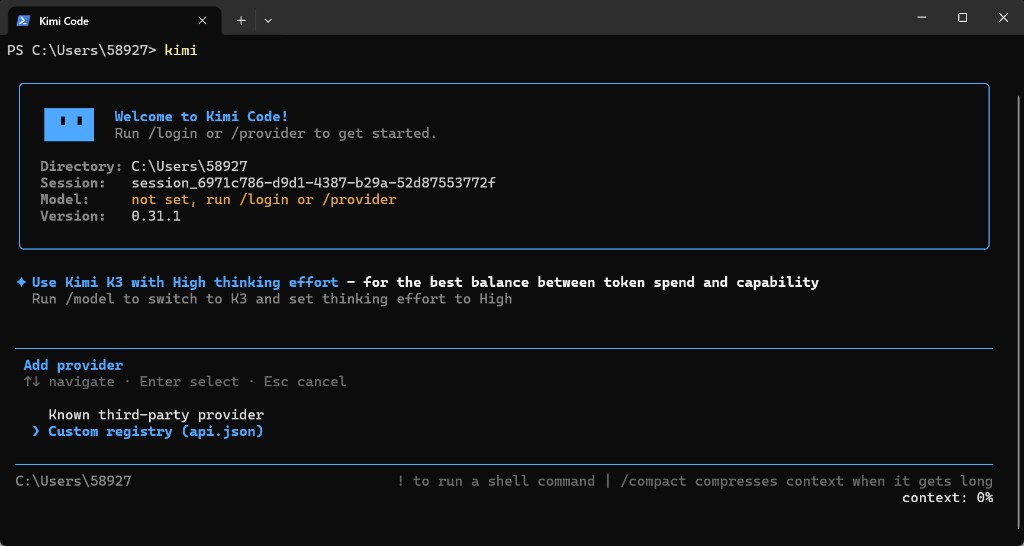
The provider setup screenshot illustrates the connection workflow; it does not replace the live model card or route status.
Why evaluate your coding models through APIMaster?
We bring model selection, live route pricing, API keys and usage tracking into one place. You can compare available Kimi models with other model families through a common API integration, then use the same account in supported coding clients.
Start with a small, repeatable task: a bug fix with a failing test, a function that needs coverage, or a documented change across several files. Compare correctness, time to completion, tool behavior and total cost. Our API key tester can help check connectivity; a successful request alone does not establish model identity or 1M-context support.
FAQ
What is Kimi K2.8 Preview?
It is Moonshot's September 11, 2026 Kimi Code release for code completion, routine development and agent tasks. It supports 1M context, images, video and three reasoning levels. Moonshot describes overall performance as approaching K3 and reports improved thinking efficiency over K2.7 Code.
What model ID should I use?
Inside Kimi Code, use kimi-for-coding. Through APIMaster, use kimi-k2.8-preview, the model ID shown on the APIMaster marketplace card. Do not substitute one provider's ID for the other.
How much does Kimi K2.8 Preview cost on APIMaster?
The September 22, 2026 live check found one active route at $1 per million input tokens and $4 per million output tokens. Prices and availability can change; check the card immediately before use.
Who can use Kimi K2.8 Preview in Kimi Code?
The latest Kimi Code model table lists Plus and above on new plans, or Andante and above on legacy plans, with a maximum 1,048,576-token context. Those membership permissions are separate from APIMaster API billing. A context limit is not unlimited usage, and API route limits should be checked separately.
Does disabling K3 thinking select K2.8 Preview?
Yes, inside Kimi Code: K3 and K2.8 requests with thinking disabled are served by K2.8 Preview without thinking. This documents Kimi Code behavior. On APIMaster, request kimi-k2.8-preview explicitly and check the selected route's supported parameters.
Can I use Kimi K2.8 Preview in an OpenAI SDK?
Yes. Set the SDK base URL to https://apimaster.ai/v1, use an APIMaster API key, and set model to kimi-k2.8-preview. Start with a small verified request and review the response and usage records.
Sources and verification date
- Kimi Code model specifications, IDs, context and routing.
- Kimi Code September 11 release notes.
- Kimi open platform pricing, which lists K3 and other public API models but no separate K2.8 Preview token price.
- APIMaster live marketplace data for Kimi K2.8 Preview, checked September 22, 2026. Availability and rates can change after publication.
Start using Kimi K2.8 Preview
Kimi K2.8 Preview brings Moonshot's everyday coding and agent model to APIMaster at $1/M input and $4/M output. Register for APIMaster, create an API key, call kimi-k2.8-preview through https://apimaster.ai/v1, and start with a task whose result you can verify. Open the Kimi K2.8 Preview card to confirm the current route before scaling up.