Claude Code Desktop API Key — 开发者模式设置指南
如何在Claude Code Desktop中启用开发者模式,使用APIMaster.ai配置自定义API密钥和基础URL。以低至7折的价格使用Claude Sonnet 4.6、Opus 4.8等模型。
Claude Code Desktop 是 Anthropic 推出的桌面 Agent 应用(含 Code 编程模式)。通过 Configure third-party inference 将推理网关指向 APIMaster.ai,即可使用广场上的 Claude 等模型,无需官方订阅。
这是 桌面 App 配置,与终端里的 Claude Code CLI 不同。开始前请 获取 API Key,并从 模型广场 确认目标 model id(如
claude-sonnet-4-6)。
前置条件
- 已安装 Claude Code Desktop(Windows 或 macOS)。
- 已从 APIMaster 控制台 复制 API Key。
- 需先开启 Developer Mode(开发者模式),否则看不到第三方网关配置入口。
第 1 步:启用 Developer Mode
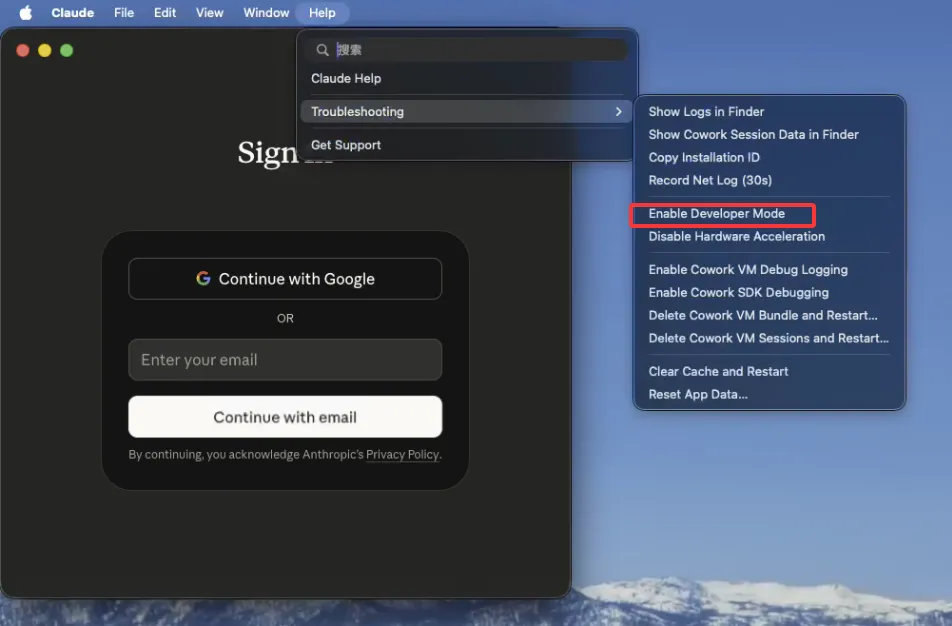
macOS
- 打开 Claude Code Desktop。
- 顶部菜单栏点 Help(帮助) → Troubleshooting(故障排除) → Enable Developer Mode(启用开发者模式)。
Windows
- 打开 Claude Code Desktop。
- 窗口左上角点 ☰ 菜单 → Help → Troubleshooting → Enable Developer Mode。
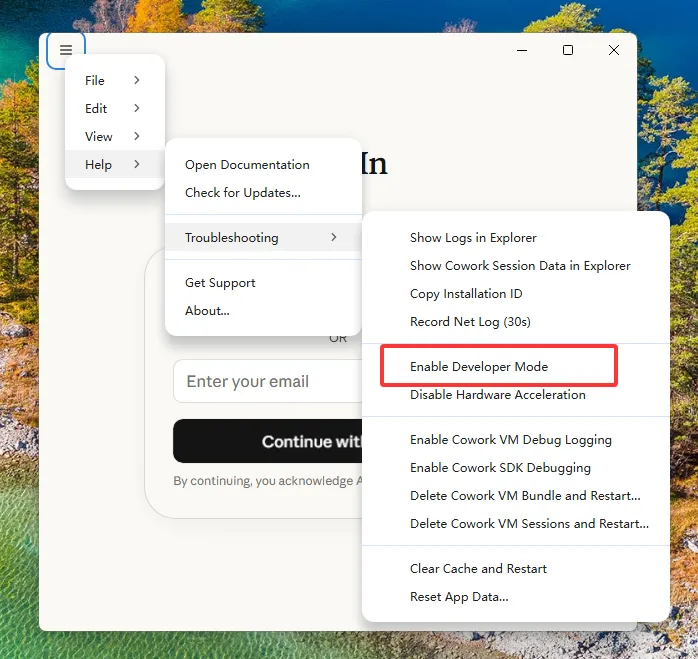
只需开启一次。重启 App 后若菜单项消失,可重复上述步骤。
第 2 步:打开第三方推理配置
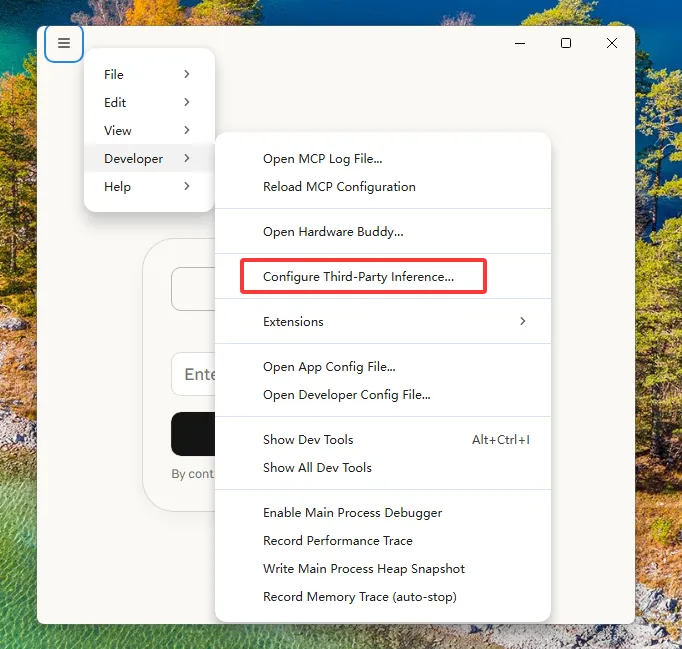
开启 Developer Mode 后,菜单中会出现 Developer(开发者) 项。
Windows
☰ 菜单 → Developer → Configure Third-Party Inference…
macOS
顶部菜单栏 Developer → Configure Third-Party Inference…(路径与 Windows 相同,入口在 macOS 菜单栏而非窗口内 ☰ 菜单)。
第 3 步:填写 Gateway 连接(Windows / macOS 相同)
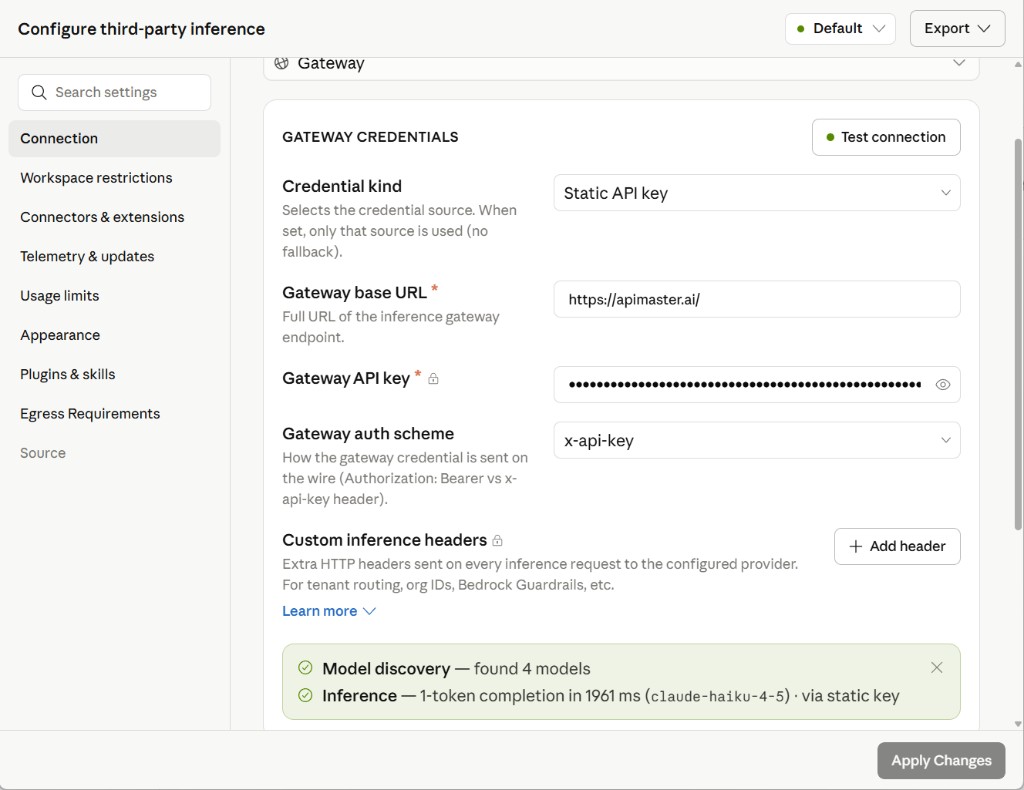
在弹出的 Configure third-party inference 窗口中,左侧选 Connection,填写 GATEWAY CREDENTIALS:
| 字段 | 填写内容 |
|---|---|
| Credential kind | Static API key |
| Gateway base URL | https://apimaster.ai/ |
| Gateway API key | 粘贴你的 APIMaster Key |
| Gateway auth scheme | x-api-key |
- 点击右上角 Test connection。
- 成功时应看到类似提示:
- Model discovery — found N models
- Inference — … completion … (claude-haiku-4-5) · via static key
- 点击右下角 Apply Changes 保存。
Gateway base URL 填
https://apimaster.ai/即可(与截图一致)。若模型发现失败,可尝试https://apimaster.ai/v1后再次 Test connection。
Custom inference headers 一般留空,无需添加。
第 4 步:切换到 Code 模式并对话
- 回到主界面,左上角将 Cowork / Code 切换为 Code。
- 点 + New session 新建会话。
- 左下角 Gateway 应显示已连接的 APIMaster 网关(带 APIMaster 标识)。
- 输入框右下角可选择模型(如
claude-sonnet-4-6);模型 id 须与 模型广场 一致。 - 发送测试消息(如
hello)验证回复。
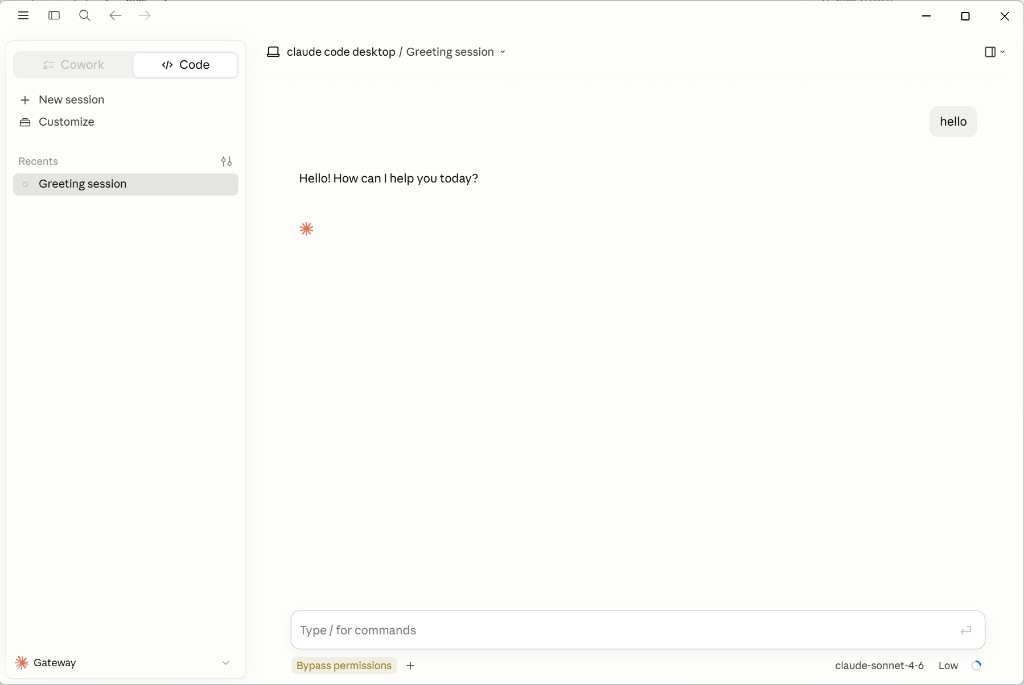
macOS 主界面布局与 Windows 相同;Code 模式、Gateway 与模型下拉位置一致,可对照上图操作。
常见问题
| 现象 | 处理 |
|---|---|
| 找不到 Developer 或 Configure Third-Party Inference | 先完成第 1 步 Enable Developer Mode,必要时重启 App |
| Test connection 失败 / 401 | 检查 API Key 是否完整、控制台是否启用 |
| Model discovery 为 0 | 确认 Gateway base URL;尝试加 /v1 后缀 |
| 对话报错 model not found | 从 模型广场 重新复制 model id,在模型下拉里选择 |
| 与 CLI 混淆 | 桌面 App 看本篇;终端 Claude Code 见 CLI 教程 |
核对清单
- Developer Mode 已启用(macOS 菜单栏 / Windows ☰ 菜单)
- Configure Third-Party Inference 中 Gateway base URL =
https://apimaster.ai/ - Gateway auth scheme = x-api-key,Key 已粘贴
- Test connection 通过,已 Apply Changes
- 主界面为 Code 模式,Gateway 已连接,模型来自广场且能正常对话